

Claude Code is often assumed to be a tool for software engineering teams only, since it runs through a terminal interface that looks purely technical. But Anthropic's latest research suggests that assumption does not hold up entirely. People outside software engineering get results with Claude Code that are close to those of software engineers in many cases. This guide explains what Claude Code for business means, the research numbers behind that claim, six use cases a business owner can start with, and the cautions worth knowing before you begin.
What is Claude Code, for a business owner
Claude Code is Anthropic's agentic AI tool that runs through a terminal. You state a goal in plain language, and Claude reads files, writes or edits code, runs commands, and carries out multi-step work to completion. It was originally built to help software teams read an entire codebase, edit multiple files at once, and manage git on their own. For the full technical picture, read Claude Code for the Enterprise.
What has changed is that Claude Code is no longer confined to engineering teams. Businesses and individuals outside the technical world are starting to use it to build their own small tools, scripts, and systems, without waiting on an IT team every time.
Anthropic's research: how well do non-programmers actually do
Anthropic published research titled "How Claude Code is used in practice" on June 16, 2026, analyzing real usage across many occupations. The key figures:
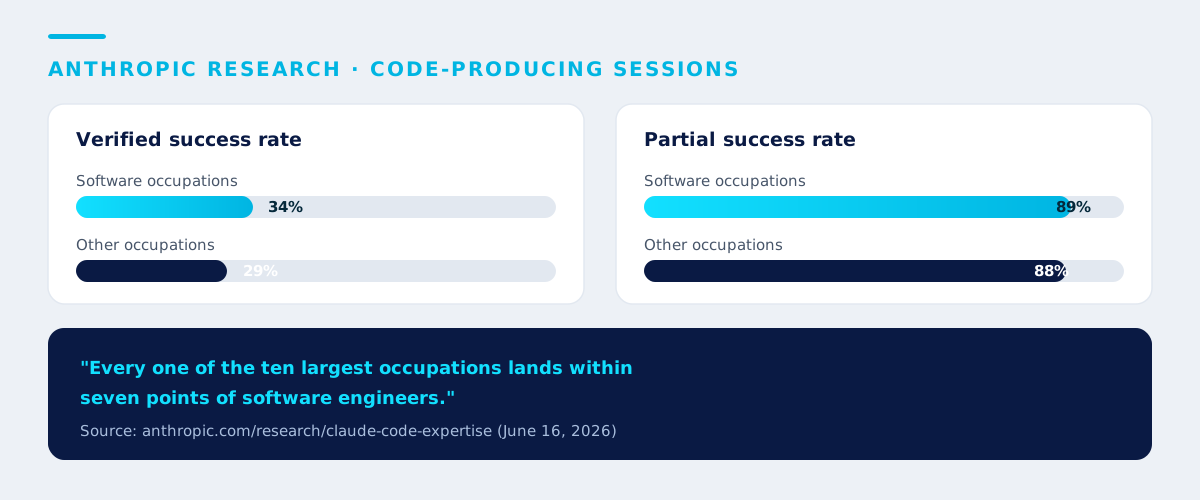
- Verified success rate in code-producing sessions: software occupations around 34%, other occupations around 29% - a gap of just 5 percentage points.
- Partial success rate: software occupations 89% versus other occupations 88% - nearly identical.
- Anthropic's own summary: "In code-producing sessions, every one of the ten largest occupations in our dataset lands within seven points of software engineers in terms of their success."
- Largest non-software occupation groups using it: Business and Financial Operations, Arts/Design/Media, Management, and Life, Physical, and Social Sciences.
- Fastest-growing groups: Management, sales, and legal occupations - management occupations actually achieved slightly higher verified success rates than software engineers.
(Source: anthropic.com/research/claude-code-expertise)
What determines success is not a coding background
The most interesting part of this research is not the numbers themselves but what sits behind them. Anthropic found that the variable that actually determines success is domain expertise - not a coding background. The more deeply someone understands the problem they are solving, the more work Claude does per instruction.
The numbers back this up directly: novice sessions had a verified success rate of just 15%, while intermediate-to-expert sessions climbed to 28-33%, and domain experts got 2-3x more output per prompt than novices. In plain terms, a business owner who knows their own problem well has a real shot at getting good results from Claude Code - no worse than a programmer who does not understand that business context.
This is the same principle that holds for any AI tool: the quality of your brief matters more than technical knowledge. Learn how to write briefs that produce usable work in Prompt Engineering for business.
Six Claude Code use cases for business owners
Here are six tasks a business owner or a non-technical team can start with using Claude Code (guidance - have someone with an IT background help with the initial setup):
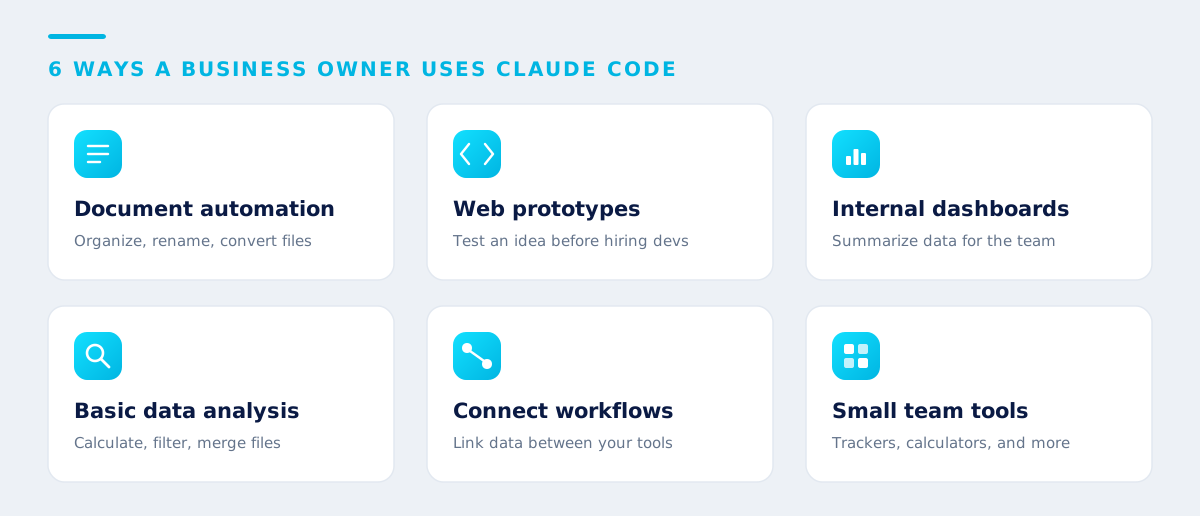
- Document automation scripts - organize files, batch-rename them, or convert files from one format to another automatically.
- Simple web or app prototypes - build a prototype page, a data-collection form, or a landing page to test an idea before hiring a development team.
- Internal data dashboards - pull data from a spreadsheet or a simple database and display it as charts or summary tables the team can check quickly.
- Basic data analysis - write a script to calculate, filter, or merge data from multiple files into one ready-to-use set.
- Connecting workflows between systems - write a script that links data between the tools you already use, such as sending form submissions automatically into a spreadsheet.
- Small internal team tools - a task tracker or a business-specific calculator that is not worth hiring a separate development team to build.
These are exactly the tasks a business owner already "understands best" - matching what Anthropic's research identifies as the real driver of success.
How to start without a dev team
The safe, effective approach is to start small, get help laying the foundation, then scale:
- Have someone with an IT background handle the first setup. Initial configuration still requires some comfort with a terminal - get help from a team member or an outside consultant just for that first step.
- Pick the task you understand best, not the most technically complex one, since understanding the problem is the real driver of success.
- Write a clear brief, as if explaining it to a colleague - state the goal, context, and the outcome you want in detail.
- Always review the output before using it for real, especially for scripts that touch important data or live systems.
- Measure results, then scale - start with low-risk work, confirm it works, then move to more complex tasks.
Intelevo offers training on using AI agents for organizations and business owners - from choosing the right tool for your team to setting up safe practices. Learn more at our in-house AI training service.
Cautions to keep in mind
Even though a coding background is not required, there are real things to watch for:
- Claude Code still runs through a terminal, unlike Claude Cowork, which runs entirely on a desktop app. There is still an initial learning curve for people who have never used one at all.
- Not every task suits a beginner. Work that touches critical systems, customer data, or has high impact should be reviewed by someone with a technical background before going live.
- Always check the output, especially scripts that edit or delete files - test them in a safe environment first.
- Data and PDPA. Be careful about feeding customer data or sensitive information into scripts or systems you build without proper access controls. Read more in AI governance and data security.
Conclusion
Claude Code for business is no longer just a tool for engineering teams. Anthropic's research confirms that non-programmers get results close to software engineers in many cases, because the real driver of success is understanding the problem, not a coding background. Business owners who pick tasks they understand well, get help with the initial setup, and carefully review the output will capture the value of this tool fastest and most safely.
If your business wants to start using Claude Code or other AI agents the right way, the Intelevo team can design the approach and train your team to use it for real. See our approach and the team behind it on the team and founder page.
Key takeaways
- Claude Code is no longer limited to software engineering teams. Anthropic's research (June 2026) found non-software occupations get results close to engineers (verified success gap of 5 points, partial success gap of 1 point).
- The real driver of success is domain expertise, not a coding background - experts get 2-3x more output per prompt than novices.
- Largest occupation groups using it: business and finance, arts/design/media, management; fastest-growing: management, sales, legal.
- Six use cases to start with: document automation, web prototypes, dashboards, data analysis, workflow connections, internal team tools.
- Still watch for: it runs through a terminal so there is a learning curve, get IT help with the first setup, and always review output before going live.
Frequently asked questions
Do I need to know how to code to use Claude Code
Not necessarily. Anthropic's research (June 2026) found non-software occupations achieve success rates close to software engineers. What determines success is understanding the problem you are solving, not a coding background. That said, Claude Code runs through a terminal interface, so there is still some initial learning curve for people who have never used one.
How is Claude Code different from Claude Cowork
Claude Code runs through a terminal and was originally built for coding work, though it has expanded well beyond that. Claude Cowork runs entirely on a desktop app with no terminal at all, designed specifically for general knowledge workers. If you would rather avoid any technical interface, Claude Cowork may suit you better. Claude Code fits work that involves creating or editing a set of files, such as scripts or a prototype website.
Which task should a small business start with when using Claude Code
Start with a task you understand well and that carries low risk, such as a script to organize files, a simple dashboard summarizing data, or a single-page website prototype. Have someone with an IT background help with the initial setup, then measure results before moving to more complex work.
Enterprise AI insights, a few emails per month. No spam, unsubscribe anytime.
Related articles
Want your team to use Claude Code effectively and safely?
Talk to the Intelevo team to plan how your business brings Claude Code and other AI agents into daily work, with team training and a governance framework. The initial consultation is free, and our team responds within one business day.
Start a consultation
An AI Transformation advisor and trainer, author of a book on using AI in marketing, and a guest lecturer at leading universities - having trained more than 10,000 learners.
View full profile